Versioning Engine
docmd features a native Versioning Engine that allows you to manage and serve multiple release versions simultaneously. The compiler automatically handles URL routing, version switcher menus, and sticky navigation state preservation.
Directory Organisation
Organise documentation into versioned source directories. The standard convention maintains the current active version in docs/ and legacy or preview releases in directories prefixed with docs-:
my-project/
├── docs/           # Current Active Release (Main)
├── docs-v1/        # Legacy Release
├── docmd.config.json
Configuration Schema
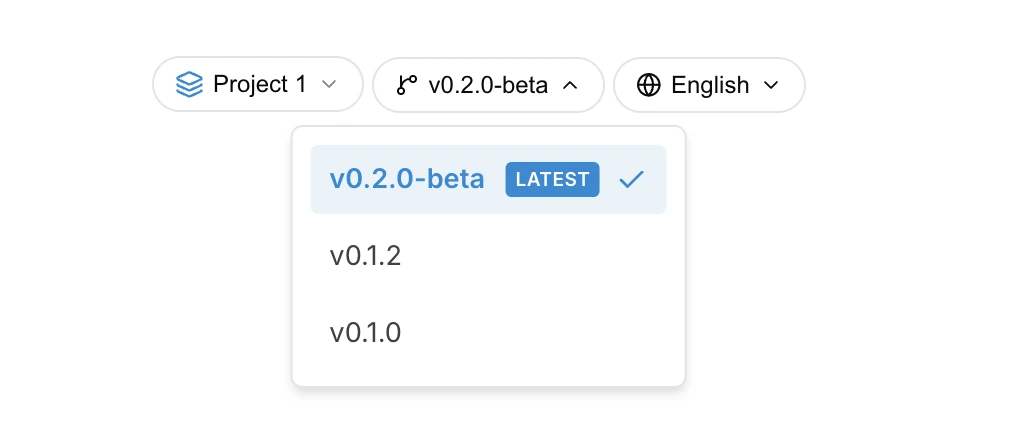
Configure versions in the versions block of docmd.config.json:
{
  "versions": {
    "current": "v2",
    "position": "sidebar-top",
    "all": [
      { "id": "v2", "dir": "docs",    "label": "v2.x (Latest)" },
      { "id": "v1", "dir": "docs-v1", "label": "v1.x" }
    ]
  }
}
Core Engine Features
1. Root SEO Route (Active Version)
The current version builds directly into your site root (e.g. example.com/). This ensures organic search traffic and external links land on your latest documentation.
2. Isolated Version Subdirectories
Non-current releases build into dedicated subfolders named after their id:
v2(Active Release) :example.com/v1(Legacy Release) :example.com/v1/
3. Sticky Route Preservation
When readers toggle between versions using the dropdown selector, docmd preserves relative path locations. If a user is reading example.com/getting-started and switches to v1, they are redirected automatically to example.com/v1/getting-started (if the target document exists).
4. Static Asset Isolation
Each version inherits shared assets from the global assets/ directory. The compiler isolates compiled assets during build time to prevent styling or script conflicts across versions.
5. Version-Specific Navigation Sidebars
Each version can maintain an independent navigation.json manifest. Refer to Navigation Configuration for cascading resolution details.
Versioning Guidelines
- URL-Friendly IDs: Use concise, alphanumeric identifiers such as
v1,v2, orbeta. - Consistent File Hierarchies: Maintain parallel directory structures across versions to maximise sticky path switching accuracy.
- Single Configuration File: Do not create separate configuration manifests for each version;
docmdprocesses all versions in a single unified build pass.
